Lunox | Personal Portfolio
A ready-to-use template for your portfolio
Thank you for choosing Lunox. This premium template is designed by Lunox Studio and is a multi-page HTML portfolio template. Every section has been carefully designed with responsive utilities to speed up your progress. For advanced customizations, smart snippets, or compatibility questions, email our support team or submit a ticket — we’ll guide you to the exact code examples and best practices.
This package is a static HTML/Bootstrap template — it does not require installation like
WordPress or any CMS platform. Your browser automatically renders all HTML files directly.
However, some features may require a database or backend setup to function properly. All you
need to do is extract the downloaded archive, keep the folder structure intact and make sure the
main file is named index.html. In addition, this template is built to be
lightweight, fast-loading, and developer-friendly. Each section is fully modular, allowing you
to edit, remove, or rearrange components without breaking the layout. You can preview any page
simply by opening it in your browser, or use a local development server (XAMPP, WAMP, MAMP, or
VS Code Live Server) for a smoother experience. Since it is 100% front-end based, you can host
the template anywhere — shared hosting, cloud hosting, or even static hosting platforms like
Netlify, Vercel, GitHub Pages, or Firebase Hosting. No configuration, installation, or
server-side setup is needed; just upload the files and the website is ready.
Main Highlights
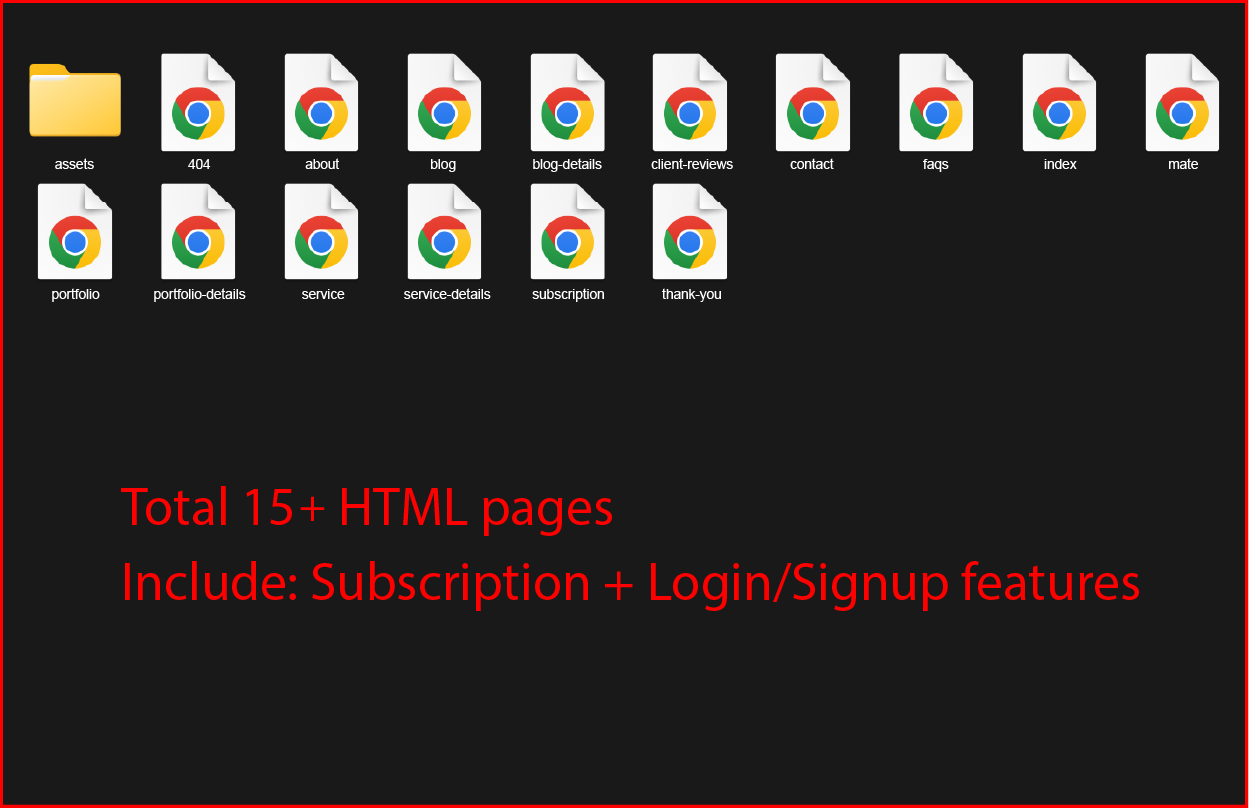
- Total Pages: 15+ HTML pages (Home, About, Portfolio, Services, Blog, Contact, 404, Subscription, Login/Signup, Thank-you, etc.).
- Assets Folder: The
assets/folder contains Smart CSS, JS with Creative features and images — always upload it along with the pages. - Start Page: The first page your host
loads should be
index.html.
How to Extract the Template
- Download the .zip or .rar file to your desktop.
- Right-click → Extract All (or use WinRAR / 7Zip).
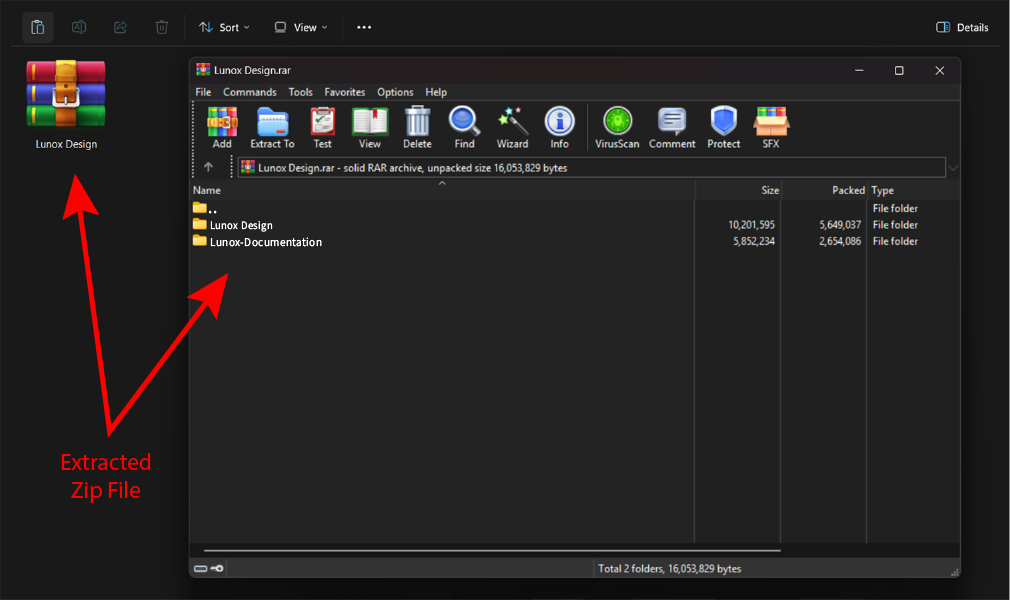
- You’ll see the extracted folder similar to the screenshots shown.
- Upload this entire folder to your hosting panel or run it locally in any browser.
Uploading to Live Server Using FTP:
First of all, If you don’t have your template on your computer, download the template to get started. When download/purchase completes you will get a package like this screenshot (after unzip).
This portfolio follows a clean and modern HTML structure, built to keep every page organized in similar layout and easy to edit. All sections are neatly arranged inside simple, reusable classes, making your layout flexible, responsive, and effortless to customize. Each part of the page flows in a smooth, logical order — so whether you’re adding new content, updating a design, or reorganizing blocks, everything stays clear, tidy, and easy to manage.
        ╔═════════════════════════════════════════╗
        ║ GLOBAL WEBSITE STRUCTURE — CREATIVE MAP ║
        ╚═════════════════════════════════════════╝

        HTML
        ├─ head
        │ ├─ favicon
        │ ├─ meta data
        │ └─ (STYLE)
        │     (bootstrap, magnific-popup, nice-select, swiper, leaflet, main.css)
        └─ body
        ├─ HEADER
        │ ├─ logo
        │ ├─ navigation (menu, dropdowns)
        │ ├─ theme-switch / color wheel
        │ ├─ translator widget
        │ └─ mobile + desktop aside menus
        │
        ├─ MAIN
        │ ├────────────────────────────────────────────────┐
        │ │ GLOBAL PAGE RHYTHM (applied to all 15 pages)   │
        │ ├────────────────────────────────────────────────┘
        │
        │ • HERO / PAGE-TITLE
        │ (headline, subtitle, breadcrumb, CTA)
        │
        │ • PRIMARY CONTENT BLOCKS
        │ ├─ section.marquee / animated strips
        │ ├─ section.about / intro
        │ ├─ section.grid / cards / gallery
        │ ├─ section.awards (h3, paragraphs, lists)
        │ ├─ section.clients / sliders (clients, reviews)
        │ ├─ section.process / timeline / workflow
        │ └─ section.cta (buttons / contact triggers)
        │
        ├─ FOOTER
        │ ├─ call-to-action
        │ ├─ social icons
        │ └─ copyright
        │
        └─ SCRIPTS
        (bootstrap, jquery, swiper, gsap, features.js, other.js main.js)

        ════════════════════════════════════════════════════════════════
        SUMMARY:
        The template uses a consistent rhythm → HEADER → HERO →
        CONTENT BLOCKS → CTAs/ASIDES → FOOTER.
        All 15 pages follow this same structural pattern with
        variations of sections (grid, gallery, blog, services, etc).
        ════════════════════════════════════════════════════════════════
How CSS is organized (recommended rhythm)
Keep vendor & plugin styles first, then site-level styles. Do not edit vendor
files directly — add your overrides to main.css (or a separate
custom.css loaded after vendor files). This keeps upgrades smooth and helps track
custom changes.
Includes stylesheets (load order)
    <link rel="stylesheet" href="assets/css/bootstrap.min.css">
    <link rel="stylesheet" href="assets/css/bootstrap-icons.css">
    <link rel="stylesheet" href="assets/css/fontawesome.css">

    <!-- plugin & utility styles -->
    <link rel="stylesheet" href="assets/css/plugins.css">
    <link rel="stylesheet" href="assets/css/swiper-bundle.css">
    <link rel="stylesheet" href="assets/css/magnific-popup.css">
    <link rel="stylesheet" href="assets/css/nice-select.css">
    <link rel="stylesheet" href="assets/css/odometer.css">
    <link rel="stylesheet" href="assets/css/leaflet.css">

    <!-- main theme (overrides & responsive) -->
    <link rel="stylesheet" href="assets/css/main.css">
Quick customization checklist
- Vendor files (bootstrap, icons, plugins): keep as-is.
- Site-level overrides: put in
assets/css/main.cssor a separateassets/css/custom.cssloaded aftermain.css. - Scoping: use namespaced selectors to avoid collisions (example below).
- Cache-busting: append
?v=1.2when deploying updates to force browsers to fetch new files. - Local dev: preview with Live Server / local http server so relative resources load correctly.
Small example: root color in main.css
    :root {
        /* ===== Gradients ===== */
        --aside: linear-gradient(135deg,
        rgba(0, 255, 255, 0.3),
        rgba(128, 0, 255, 0.3),
        rgba(255, 0, 0, 0.2) 80%);
        --bg: radial-gradient(circle,
        rgb(0, 43, 43) 0%,
        rgb(0, 0, 0) 100%);
        --price: linear-gradient(135deg,
        rgb(0, 255, 255),
        rgb(128, 0, 255),
        rgb(255, 0, 0) 70%);
        --marquee: linear-gradient(135deg,
        rgb(50, 255, 255) 0%,
        rgb(0, 255, 255) 40%,
        rgb(0, 187, 187) 70%);

        /* ===== Colors ===== */
        --banner: #003232; --body: #000;
        --white: #fff; --gray: #4b4b4b;
        --title: #151519; --inverse: #131317;
        --base: #00ffff; --hover: #00aaaa;
        --pra: #999999; --other: #ff0000;
        --cusborder: #262525; --icon-bg: #171717;
        --fade: rgba(0, 0, 0, 0.8)
    }
In addition, this project includes a creative JS features — built from 6 focused custom modules along with a set of carefully selected vendor plugins that together create smooth, designer-friendly interactions.
Highlights:
These blocks includes a 360° theme control panel with a mobile-friendly color
wheel to adjust hue, saturation, lightness and contrast of whole portfolio.
A full-featured review system where clients can add reviews, edit (after
login), like or pin reviews for admin — the admin will have full control to manage client
reviews, including deleting and replying to them.
smooth scrolling feature also includes by
JS plugins, Isotope-based project filtering setup has also been installed, so user can easily
find own project easily from project stack.
Seven custom UI features includes split-text
reveal animations on scroll, two special hover effects, creative preload and cursor (dot/ring)
animations, buyer also get editable map locations. An animated 404 page for error and thank-you
reveal page on submit.
Developer rules: never edit vendor files — place all custom wiring in
main.js and supporting modules, always check if plugins exist before using them,
and maintain graceful fallbacks.
Includes script files (recommended load order)
    <script src="assets/js/jquery-3.7.0.min.js"></script>
    <script src="assets/js/bootstrap.min.js"></script>

    <!-- plugins & utilities -->
    <script src="assets/js/isotope.min.js"></script>
    <script src="assets/js/jquery.magnific-popup.min.js"></script>
    <script src="assets/js/jquery.nice-select.min.js"></script>
    <script src="assets/js/gsap.min.js"></script>
    <script src="assets/js/leaflet.js"></script>
    <script src="assets/js/viewport.jquery.js"></script>
    <script src="assets/js/jquery-plugin-collection.js"></script>

    <!-- project custom scripts -->
    <script src="assets/js/main.js"></script>
    <script src="assets/js/features.js"></script>
    <script src="assets/js/review.js"></script>
    <script src="assets/js/subscription.js"></script>
    <script src="assets/js/trans.js"></script>
    <script src="assets/js/other.js"></script>
main.js Orchestrator
Initializes compulsary setup — preloader, responsive modules, svg configuration, setup of global events & theme control system
- Role: Central init hub — runs on DOM ready and wires plugins to app logic.
- Key behaviors: preloader timelines, marquee & odometer updates, global event bus, clipboard helpers and smooth scroll hooks (ScrollTrigger integration).
- Integration notes:
Load after vendors (GSAP, nice-select). Use
deferfor main.js when possible to preserve execution order.
features.js UI Engine
Complex UI patterns — detach/attach effects, rotor masks, desktop/mobile aside setup and title split behaviours.
- Role: Drives overlay orchestration, focus traps and mobile/desktop differences.
- Key helpers:
detachFX()/attachFX(), focus management and accessibility fallbacks. - Tip: Test overlay flows and aside open/close across viewport sizes when editing this file.
review.js Data & UX
Client review system — localStorage persistence, CRUD flows, filtering, bulk actions, and admin moderation controls.
- Role: Handles reviews (create/read/update/delete), like/pin/reply flows and renders UI lists.
- Persistence: Uses
localStoragefor likes & saved reviews with optional server sync — document keys and include an admin export/reset tool. - Auth: Signup/login/reset flows enable users to manage their own reviews; admin can moderate or bulk-delete.
Quick rules of the road
- Load order: core libs
(jQuery) → vendors/plugins (GSAP,
Isotope,
Leaflet) → custom script. Keep
main.jsfirst so it can safely initialize block and plugins. - Never change custom
files: do not edit the core files.
Instead, add
your separate custom script. The main sensitive files are
main.jsandfeatures.js. - Translations setup:
trans.js runs 20+ languages at
runtime — add new
flag and update { src: "flag", lang: "code" } under
FLAGS/LABELSvariable. KeepTRACK_SELECTORSvariable unchanged, it's a helper key for RTL version languages. - 360° color panel &
wheel: Use sliders to adjust HSL
values, clamp them
to valid ranges, convert to CSS-compatible colors and register all newer CSS root color
in
colorVarsusingrequestAnimationFramefor smooth UI. - Review system: In the
backend, store every review along
with the user
ID, timestamp, and status
(state.reviews — stores reviews). Track all edits, likes, pins, and deletions. Keep version history so changes can be undone. Maintain regular backups to ensure data safety and consistency. - Feature-detect & graceful
fallback: guard plugin calls
(e.g.
if (typeof Isotope === 'function')) and provide fallback UI when not available. - Defer/async caution:
avoid async attributes on plugins
that depend on
load order. Use
deferfor scripts that can run after parsing but must preserve order. - Testing tips: to debug
overlays, split-text reveals, or
aside-open
flows, clear localStorage keys, enable debug logging in
features.jsand test across mobile/desktop breakpoints.
Example: theme reset setup in main.js
/*reset on db click */
$reset && ($reset.ondblclick = e => {
    // Prevent default double-click action
    e.preventDefault();  clearTimeout(resetTimeout);

    // Reset theme flags in localStorage
    try {
    localStorage.removeItem('siteTheme');
    localStorage.setItem('siteThemeDisabled', '1');
    } catch (e) { }

    // Restore original CSS variables (theme reset)
    Object.entries(original).forEach(([v, val]) => root.style.setProperty(v, val));

    if (hueEl) hueEl.value = 0; if (satEl) satEl.value = 100;
    if (lightEl) lightEl.value = lastLightVal = 50;  if (contEl) contEl.value = lastContVal = 0;
    // Reset HSL sliders and internal variables

    // Toggle visibility of lightness/contrast UI
    showContrast = false; $$('#lightness').remove('d-none');  $$('#contrast').add('d-none');

    // Update UI icons, tracks, and apply changes
    toggleIcon();  updateTracks();  applyAll();

    // Reset banner section to default image
    isBannerForced = false;
    if (bannerSection) bannerSection.style.backgroundImage = `url('${bgImgs.default}')`;
});
Example: layout of translator trans.js
$(".translator").on("click", function () {
    // Prevent multiple overlays from opening
    if ($(".overlay").length) return;

    // Create flag images for all available languages
    const imgs = (window.flags || FLAGS).map(f =>
        `<img src="assets/img/icon/${f.src}.webp" data-lang="${f.lang}" class="flag"
        alt="${(LABELS[f.lang] || f.lang)}">`
    ).join('');

    // Animate overlay visibility
    requestAnimationFrame(() => overlay.addClass("visible"));

    // Close overlay if background clicked
    overlay.on("click", e => { if (e.target === e.currentTarget) overlay.remove(); });

    // Load previously selected language and mark it
    const savedLang = (function () {
        try { return localStorage.getItem("selectedLang"); }
        catch (e) { return null; }
    })();
    if (savedLang) {
        $(".flag").removeClass("selected");  $(`[data-lang='${savedLang}']`).addClass("selected");
    }
});
Example: countries.json usage subscription.js
$(document).ready(function () {

    $.getJSON('assets/js/countries.json', function (data) {
    // Fetch countries.json and create <option> elements
    const options = data.map(country => `
    <option value="${country.value}">${country.text}</option>
    `).join('');

    // Inject options into #citizenship and #residence select elements
    $('#citizenship, #residence').html(options);

    // Reinitialize nice-select after injecting options
    $('#citizenship, #residence').niceSelect('destroy').niceSelect();
    // Reinitialize nice-select plugin for updated selects
    });
});
Below is a detailed, documentation-style list of every major feature includes in this portfolio. Each item explains what it does, where to find the code, customization notes, and a gif preview, so that you can easily understand every concept.
360° Theme Panel (user-friendly)
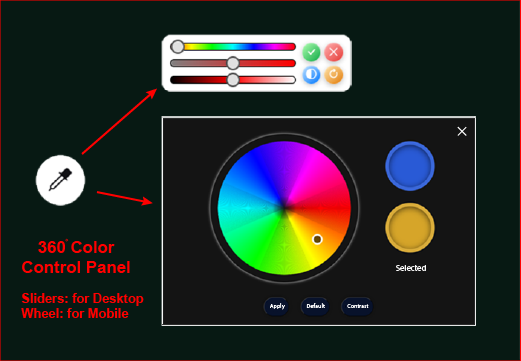
This is a small and mobile-friendly theme control panel that allows you to easily
manage your showcase colors using Hue, Saturation, Lightness and
Contrast. After adjusting, when you click the apply (tick) icon, the system
saves your settings in localStorage and CSS variables. This way, the next time
you open the page, your previously saved color settings will be applied automatically.
What it does?
- Real-time HSL + contrast adjustments setup using CSS custom properties.
- Also Includes Hue wheel for visual color picking on mobile devices.
- These preferences persist across all pages using
localStorage.
Customization notes:
-
Theme file:
/asset/js/main.js& CSS root variables in/assets/css/main.css. - To add color or gradient, edit the CSS variables in
:rootand the initial values set incolorVarsvariable inmain.js. - You can toggle light/dark mode in portfolio using contrast button and slider.
- If you want reset to default theme
double clickon reset button,on singleclick it only disable/enable default background of dashboard.
Translation System (Optional)
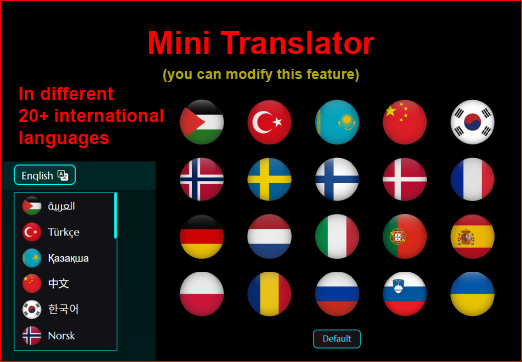
This is an optional client-side Google Translate language switcher. It can
automatically
translate page content into 20+ languages. These translations are machine-generated and
provided for convenience only — it is not manually verified.
Note: You
can disable or remove this feature entirely, it's up to you. See the "Disable /
Remove" instructions below.
What it does?
- It loads language data from
trans.jsand uses country flag icons for selection. - On switch language it saves selected language to
localStorageand updates UI text dynamically. - Otherwise, it set to default language
ENfallback.
Customization notes:
- Language file:
trans.js, Loader:<div class="translator"></div> - To add a new language, browse desired flag icon and register it in
FLAGS/LABELSintrans.js(or your language manifest).
Privacy note: The Google Translate widget sends page text to Google servers for translation. If you have privacy, regulatory or GDPR concerns, disable the widget or use manual/server-side translations. Buyers should consider privacy requirements for production sites.
Map Integration (Optional)
This is a small but amazing feature give professional look to portfolio with an easy UI for all buyers to set their own location and update the marker.
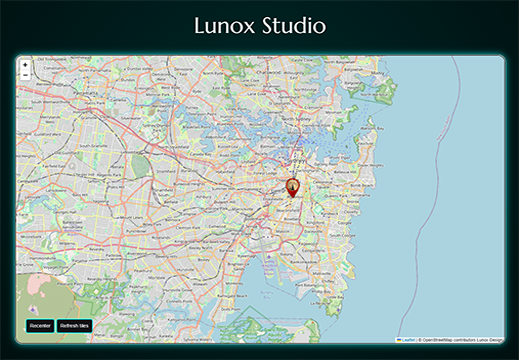
Where to look?
You can find it in /pages/contact.html. And also easily
disable or replace by provider
keys (Google/Mapbox/Leaflet) in
config.
Customization Notes:
you can add your location by update Latitude & Longitude:
let center = [-33.8962045, 151.2045171]; in
/assets/js/other.js
Tip: You can also add your custom marker by
import:
iconUrl: 'assets/img/marker.png'
Seven Custom UI Features
Creative Preloader Animation
Custom preloader that runs on Index page load and triggers the main
entrance
animations on completion.

Where to look?
Preloader: /assets/js/preloader.js. Hook into page ready
events to start
main timelines.
Customization notes:
Preloader: You can easily disable or modify it by commit
Preloader section
from index.html and
main.js
Review System (user-submitted)
A complete review setup where clients can submit and edit their own reviews after login, and like or pin others’ reviews. Admin has full control to manage all reviews through a secure login.
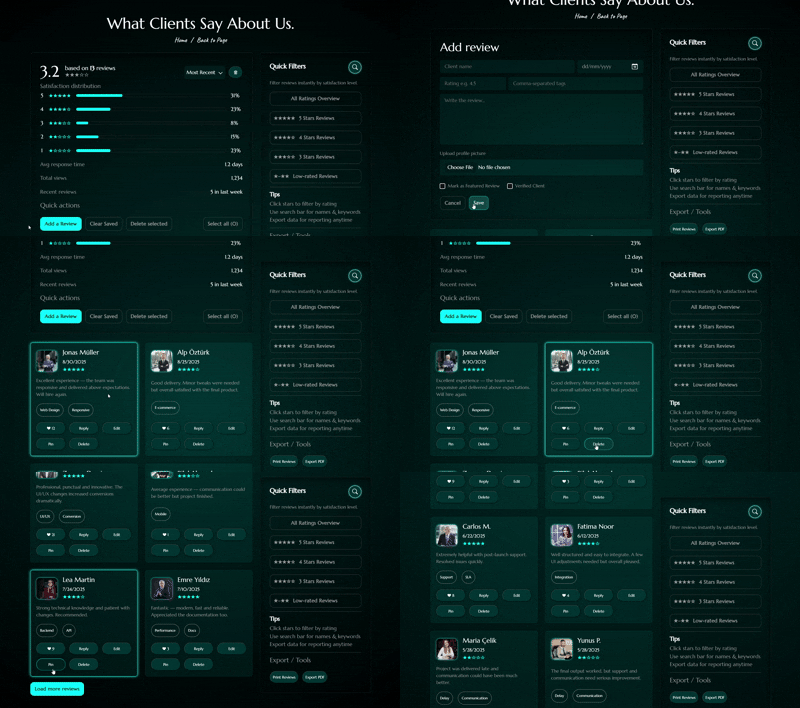
What it does?
- Clients/users can submit reviews and like other users' reviews and also users may edit only their own reviews after login to thier account.
- Users can reply to reviews (threaded replies) and pin/unpin reviews for their view.
- Admin (portfolio owner) will have complete right to reply, approve or delete any review.
Where to look?
Frontend: /pages/client-reviews.html and
/assets/js/reviews.js.
Security & best practices
- Always verify user session and ownership before allowing edit or delete.
- Rate-limit review submissions and add spam protection (CAPTCHA or heuristic
checks) bt
reCAPTCHA.php. - Sanitize and validate inputs on the server-side; use prepared statements before saving to the database.
Isotope Project Filters
Project listing uses Isotope for filtering project. Users can filter by project category.
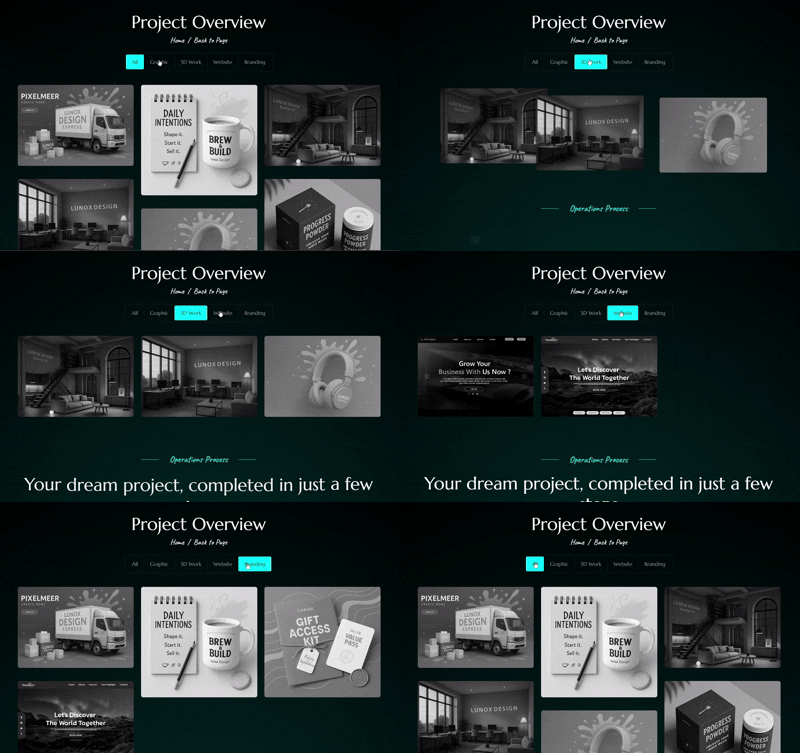
What it does?
- Animated grid layout with smooth transitions & gray filter change on hover.
- Multiple filter modes: Gragphic, 3D Work, Website, Branding.
Customization notes:
- Isotope init:
/assets/js/main.js. EnsureimagesLoadedruns before initializing. - To add more filters, add data attributes in
portfolio.html(e.g.data-filter=".(category)") and register new projects.
Smooth Scroll & Split Text Animation
In addition, added a custom smooth-scrolling wrapper with scroll-triggered animations and split-text reveals for headings as they enter the viewport.
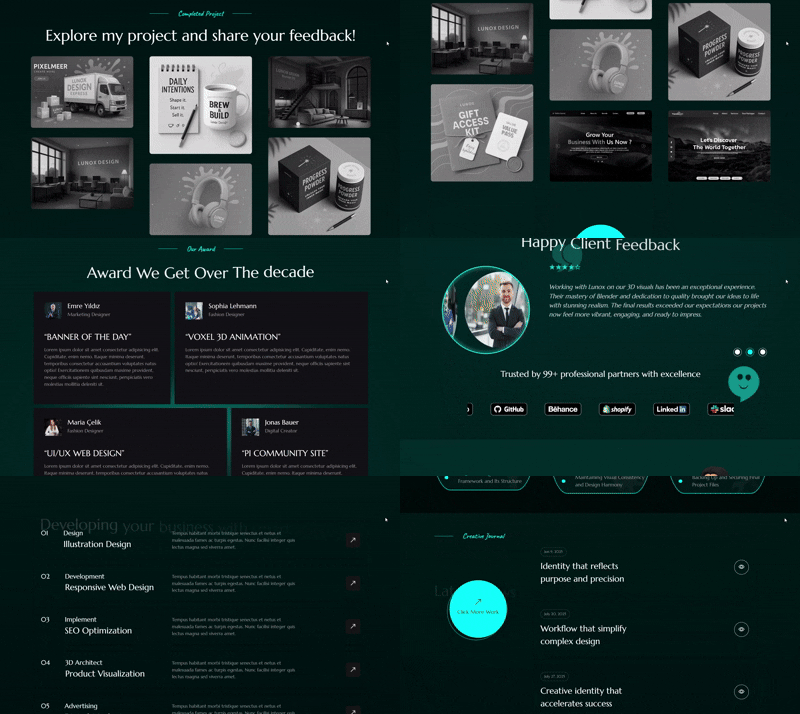
What it does?
- Smooth-scrolling wrapper (e.g.
#smooth-wrapper/#smooth-content). - split-text animation is a bonus feature, it split complete title in words and then animate.
Customization notes:
- these features are in:
/assets/js/features.js&/assets/js/other.js - You can disable both by commit
smooth-scrollandsplit-textanimation code block. - You can browse 8 more split animation preset from
/assets/js/other.js
Subscription/Login Setup
A custom subscription and login form is also includes in this portfolio to
perform specific tasks. It will be valuable once linked with form.php, which is
not included
in this portfolio.
Where to look?
form pages: pages/subscription.html &
/assets/js/subscription.js
Customization notes:
- Subscription page is link with
service.htmlpage you can easily access through service page. - A login page is created to manage client reviews and ensure security setup.
404 Animation & Thank You Page
This portfolio includes an animated 404 page to make errors fun, and an engaging 'Thank You' page that appears after users submit the contact form.
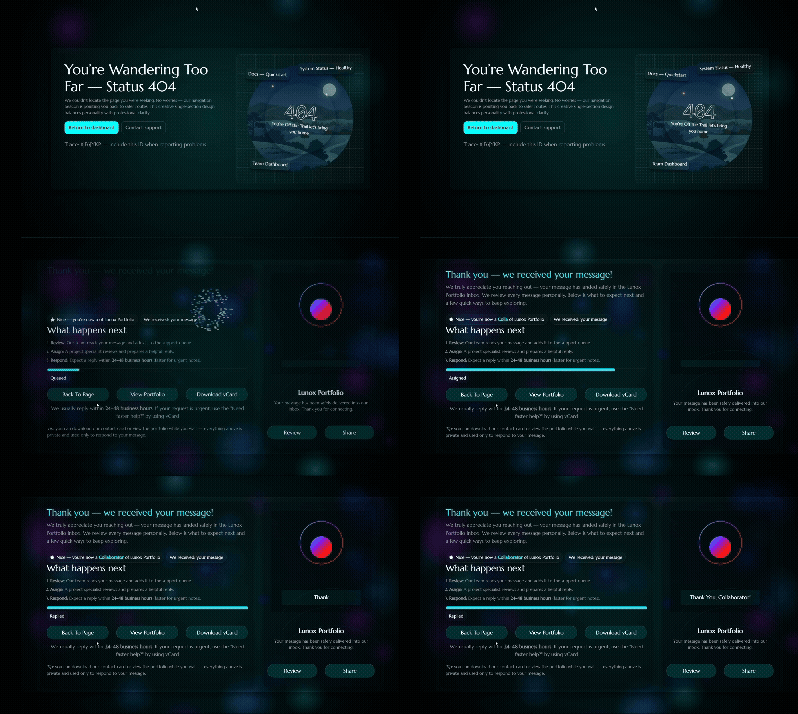
Where to look?
Pages: /pages/404.html and
/pages/thank-you.html
Customization notes:
- You can also disable these features if you don't want these pages
- If any user submit contact form or send review without username, the config box will automatically put placeholder like Insider, Member, Friend etc according to user description.
Desktop Aside User-Interface
For more professional look includes quick access and responsive aside panels for desktop and mobile devices with quick access to other pages and about profile.
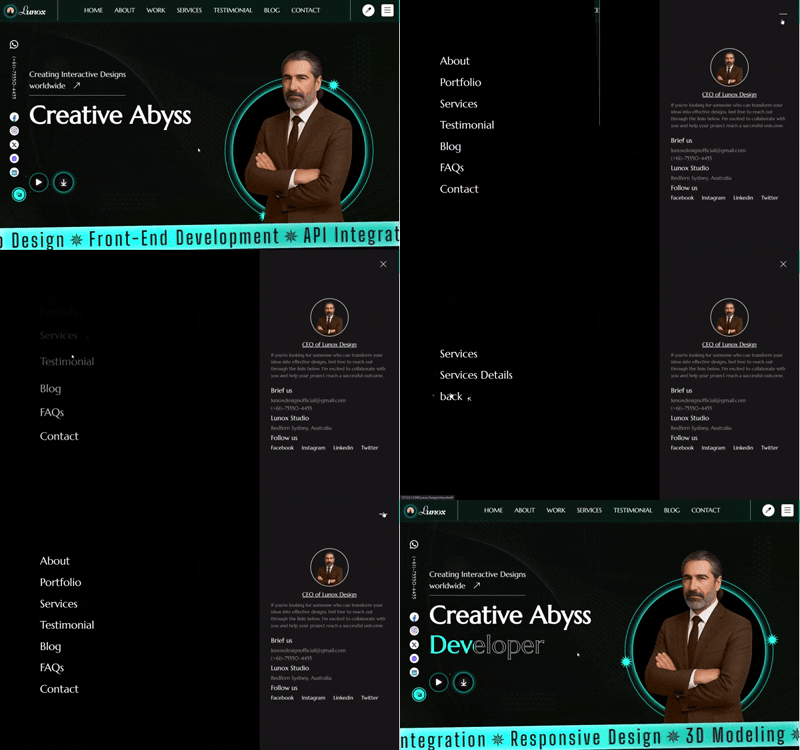
Where to look?
Aside UI: /pages/*.html &
/assets/js/main.js.
Customization notes:
- You can modify or link your more custom pages in aside according to your need it's up to you.
- This aside is not only for main-menu it is also for deleted reviews, you can
check review aside in
client-reviews.htmlpage.
Implementation Notes & Best Practices
- Translation: add or update languages by:
- In
trans.jsfile modifyFLAGS = { src: "flag", lang: "lang" }and inLABEL variable. - Use reload option if the page is not translating correctly.
- In
- Reviews: Make your user review account setup due to this:
- You will be able to reply or delete reviews and always check ownership server-side before edit/delete.
- Use prepared statements and sanitize inputs.
- Subscription: Set up your subscription system to activate plans.
- Set the price value from
service.htmlandsubscription.html. - Create a script to receive form data (name, email, plan, payment info) and process the subscription.
- Send a confirmation email or success message on
thank-you.htmlpage after the subscription is activated.
- Set the price value from
- Accessibility: Use
contact.php,subscription.php&reCAPTCHA.php.
Ensure the template is accessible to all your clients and maintain its backend scripts carefully due to extra features.
Tip: Want to understand this template better? Visit the FAQs page and try 30+ short Quick Quiz which help you to learn all features in a fun and fast way.
Quick configuration step
Open contact.php and swap the placeholder RECIPIENT_EMAIL for the
destination that should receive submissions. No further changes are required.
<?php
if (isset($_POST["submit"])) {
// Sanitize inputs
    $name = htmlspecialchars(strip_tags(trim($_POST['name'])));
    $email = filter_var($_POST['email'], FILTER_SANITIZE_EMAIL);
    $subject = htmlspecialchars(strip_tags(trim($_POST['subject'])));
    $message = htmlspecialchars(strip_tags(trim($_POST['message'])));

    // Recipient email (placeholder)
    $to = 'YOUR_EMAIL_ADDRESS';

    // From header (simple text)
    $headers = "From: Lunox Contact Form <$email>\r\n";
    $headers .= "Reply-To: $email\r\n";

    // Email body (plain text)
    $body = "You have received a new message from your contact form.\n\n";
    $body .= "Name: $name\n"; $body .= "Email: $email\n";
    $body .= "Subject: $subject\n\n"; $body .= "Message:\n$message\n";

    // Send mail
    if (mail($to, $subject, $body, $headers)) {
        header("Location: thank-you.html"); exit;
    } else {
        die("Error sending message. Please try again later.");
    }
}
?>
Fonts Used
All fonts used in this template are free and provided by Google Fonts.
Fonts Included:
- Almarai (for RTL version)
- Big Shoulders
- Caveat
- Marcellus
- Tangerine
Icons Used
- Font Awesome 7 (Free Version)
https://fontawesome.com
Used under the Font Awesome Free License. - Bootstrap Icons
https://icons.getbootstrap.com/
Used under MIT License.
Demo music (license notice)
Demo music is used from Mixkit for preview purposes only. It is not included in the downloadable package.
JavaScript Libraries & Plugins
The following libraries are used under their respective MIT / Open-source licenses:
- jQuery 3.7.0
- Bootstrap 5.x
- Isotope
- Magnific Popup
- jQuery Nice Select
- GSAP
- Leaflet.js
- Viewport jQuery
- jQuery Plugin Collection
Images
Some images used in the template are AI-generated and belong exclusively to the template author.
Custom Code
All custom JavaScript, CSS, and HTML code included in this product is written by the template author and is fully original.
We're here to help — anytime you need us
Thank you for choosing this template! If you encounter any issues — whether installation, customization or compatibility, we offer several quick ways to get help. You can reach us using the options below.
Email Support ✉️
For any issues with the template — such as installation, setup, errors, or troubleshooting — please email us. Attach your screenshots and purchase code so we can assist you ASAP and guide you step-by-step.
Email UsCommunity & Chat 💬
Join our community space to ask questions, discuss features, or explore tips shared by other users. It’s a great place to get quick feedback, discover solutions, and stay connected with everyone using the template.
Open communityUpdates & Changelog ⬆️
Stay up to date with the latest improvements, fixes, and new features. You can always check the changelog to see what’s new and ensure your project is running on the best version of the template.
View changelog